A hologram speaker is not an immersive keynote
A hologram speaker is usually a recorded or remote likeness of a person projected onto a stage. An immersive keynote is different: the speaker is live in the room, and 3D technology builds a world around them. Both look futuristic. Only one can read your audience and respond in real time.
Planners use “hologram keynote,” “holo presentation” and “immersive keynote” as if they meant the same thing. I understand why. I do use holographic technology on stage. But I deliberately call what I do immersive, not holographic, because the hologram is the least interesting part.
The difference matters when you book. One format gives you a visual spectacle. The other gives you a keynote that happens to look like one, with a human being in charge of every second.
KEY TAKEAWAYS
- A traditional hologram keynote projects a pre-recorded or remote likeness of a speaker, often with limited interaction.
- In an immersive keynote, the speaker stays live on stage while 3D visuals create an environment around them.
- Live means adaptable: the speaker can read the room, change pace and respond to the audience.
- Most conference venues already have much of what a 3D keynote needs: a room that can go dark, a stage, a projector and an AV team.
- The format fights audience fatigue, signals innovation, opens new sponsor moments and creates social buzz.
- Choose the speaker first and the technology second. The tech should carry the message, never replace it.
What is a hologram speaker?
When people hear “holographic keynote,” they usually picture a speaker’s likeness projected onto a stage from somewhere else in the world. The person is captured on camera, often in advance, and appears as a three-dimensional image that creates the illusion of presence.
The concept is fascinating and it has its uses. But it is primarily visual. A hologram speaker often has to display a pre-recorded or scripted version of themselves, which means limited interactivity, limited customization and very little room to change course when the room needs it. Impressive, yes. Personal, not so much.
Hologram speaker vs. immersive keynote: what is the difference?
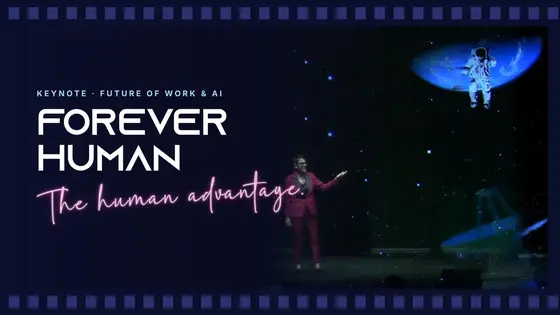
My immersive keynote goes beyond the classic holographic presentation. I am physically on stage, live, the whole time. At certain moments I may appear as a holographic avatar, and the 3D technology turns the stage into an environment that changes around me. But I am there, talking to your people, reacting to them and to the world I step into.
That changes how the audience engages. They are watching a story unfold around a person they can connect with. It is storytelling, emotion and experiential learning, with technology as the stage set, not the star.
Here is the short version:
- Technology: a beamed-in hologram uses holographic technology to display themselves. An immersive keynote uses 3D projection to display an entire environment.
- Presence: a hologram appears projected on a stage or screen. In an immersive keynote, the speaker is in person, inside a three-dimensional world.
- Interaction: a hologram is a visual spectacle with limited interaction. An immersive keynote blends storytelling, content and live interaction with the audience.
- Connection: a projected likeness may lack personal connection and authenticity. A live speaker can build real connections with the people in the room.
- Adaptability: a hologram has limited ability to respond in real time. A live speaker adapts on the spot.
- Purpose: a hologram keynote often focuses on the visual wow in several locations at once. An immersive keynote focuses on lasting impact and meaningful content in one room.
In the end, the right choice depends on your goals, your audience and the impact you want. If you need one speaker in five cities on the same afternoon, a beamed-in hologram may be your answer. If you need your people to change something on Monday, you want the human in the room.
It is not about seeing a holographic image. It is about experiencing a story that unfolds around a human being.
How does 3D projection work in an immersive keynote?
At the core of the experience is 3D projection technology. Slides are two-dimensional. Hologram presentations often rely on recorded content. 3D projection creates visuals that seem to exist inside the physical space, with real depth.
The content is built with care. Every animation and visual element is designed for the theme of the keynote, and for your event in particular, then mapped onto the stage so the real and the virtual blend. That is what allows me to interact with the visuals instead of standing in front of them.
Audio and atmospheric lighting complete the effect. Together they place me inside the presentation and engage every sense in the room. The audience stops being an observer and becomes a participant, which is exactly what makes the content stick.
What does a venue need for a hologram speaker?
The technical side looks intimidating on paper. In practice, it is simpler than most planners expect, because most conference venues already have the space, the sound and the AV team. I bring my own 3D equipment as luggage. Your AV team provides the rest. Here is what the ideal setup looks like:
- A dark room. The darker the room, the more vivid and lifelike the 3D visuals. Safety comes first, though: emergency and exit signs and any lighting required by law or venue policy stay on.
- A dark background. A dark curtain, a dark wall, or LED screens switched off or set to black. In large venues, IMAG screens make sure the back rows see every detail.
- A generous stage. A bigger stage means a bigger world. The ideal is a stage about 32 feet wide and 15 feet deep, with enough ceiling height for the setup. Smaller stages can work too. We figure it out together.
- Controlled lighting. The room is dark, but I still need to be lit, along with any props. It is a straightforward lighting plan your team can handle easily.
- A projector and a truss. Most venues already have a projector that meets the specifications, plus a truss at the top front of the stage for lighting.
- Recording and photos. Attendees and organizers are welcome to film and photograph the keynote. Please skip the flash in the front rows. A sudden burst of light interrupts the 3D effect for everyone nearby.
- An enthusiastic AV team. They handle lighting, sound and the equipment on the day. My team and I guide them through every step with detailed instructions, and we stay available throughout.
Setup takes about 60 to 90 minutes, plus a run-through of similar length. Once we are booked, your production team gets every technical detail directly from my team.
Why do planners book a hologram speaker?
Audience engagement that lasts
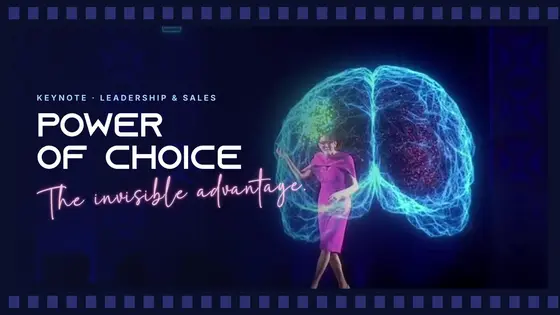
Keeping an audience focused for an entire conference is hard. After a few back-to-back slide decks, attention fades. 3D changes that. Instead of telling a story, I can show it: step inside a holographic brain to show how decisions happen, change my appearance on stage to demonstrate perception, or surround myself with the ideas I am talking about.
This is not a gimmick. When people see and experience an idea, they remember it. In a conference full of distractions, that matters. If a keynote does not make people sit up, lean in and forget their phones, was it worth delivering?
A statement about innovation
Every conference wants to be the place where new ideas come to life. But if your event looks and feels the way it did five years ago, does it still say innovation? A 3D keynote tells attendees, sponsors and stakeholders that your event shows the future instead of talking about it. People leave informed, and also convinced they saw where live events are headed.
Breaking through audience fatigue
Every planner knows the pattern: a strong start, and by mid-afternoon the phones are out. Even great speakers lose a crowd when the format never changes. A life-sized, moving 3D world on stage is impossible to ignore. It disrupts expectations, and disrupting expectations disrupts distraction. When abstract ideas become something people can see, the session stops being a lecture and becomes an experience.
Customization at a new level
No two events are alike, so no keynote should feel copy-pasted. With holographic effects, the stage itself becomes part of the story. Your leaders can appear as life-like avatars. Your industry’s world can surround the audience. Your values can become the backdrop. Personalized content is expected. A personalized environment is the next level.
Technology that deepens human connection
A common worry is that event technology puts distance between speaker and audience. Done right, it does the opposite. Because I stay physically present, I can respond to reactions and interact with both the audience and the environment in real time. The human element stays at the center. That is also the skill to look for in any speaker who works with 3D: someone who can command a stage alongside immersive visuals without letting them steal the message.
Sponsorship moments people remember
Logos on banners and ads in a program are not thrilling. In a 3D keynote, a sponsor’s product can appear on stage, or their message can become part of the environment. Sponsors stop being a logo in the background and become part of the story, which also helps you offset the cost of the experience. More ideas in my guide to sponsor activation beyond logos and lanyards.
The kind of buzz you cannot buy
Attendees want to capture something they have never seen and share it. When they post, they show that they were at an event at the front of their industry, and their peers notice. That buzz extends your reach, builds urgency for next year’s registration and turns your conference into the one people talk about. When was the last time anyone rushed to post a clip of a slide deck?
Future-proofing your conference
The event industry moves fast. Blending technology with storytelling, and human connection with digital immersion, is no longer an experiment. Audiences start to expect it. Conferences that offer it set themselves apart, and attendees who leave in awe come back, and bring colleagues.
Best practices for a hologram keynote at your event
Choose the speaker before the technology
Look for a speaker who is an expert in their field and who understands immersive storytelling. They should craft strong narratives, connect emotionally and blend live and holographic moments naturally. The technology amplifies a great keynote. It cannot rescue a weak one.
Check your venue early
Confirm that the room can go dark, that the stage background can be dark, that the venue allows a truss at the front of the stage and that a projector can be positioned correctly. Those four answers tell you almost everything.
Never skip the rehearsal
A run-through lets your team synchronize the 3D visuals, audio cues, lighting and any interactive moments. It is where the timing between live performance and visuals gets fine-tuned, so the show feels effortless when the doors open.
Use the stage beyond the keynote
Because the speaker stays live, the content adapts to your theme and goals. And the stage can become your canvas too: hosts and emcees can use the 3D experience for openings, closings, award moments, reveals or sponsor segments, so the immersive feeling carries through the whole event.
New to the format? Start with what an immersive keynote experience is, or read the answers in my immersive keynote FAQ. And if you want to see what it looks like inside your own event, have a look at the 3D experience.
Frequently asked questions
What is the difference between a hologram speaker and an immersive keynote speaker?
A hologram speaker is typically a pre-recorded or remote likeness projected onto a stage, with limited interaction. An immersive keynote speaker is live and physically present, while 3D projection creates an environment around them. The live speaker can read the room, adapt in real time and connect personally with the audience.
How much setup time does a 3D keynote need?
It depends on the venue and its AV capabilities, but a prepared production team can integrate it into a standard event setup. For my keynote, setup takes about 60 to 90 minutes plus a run-through of similar length. The equipment travels with me, and your team receives detailed technical guidelines in advance.
Can a hologram keynote be live-streamed or recorded?
Yes. Give the camera crew a heads-up, because filming in a nearly dark room needs specific camera settings and positioning to capture the depth of the 3D effects. With the right balance, the visuals look just as strong on screen and on IMAG as they do in person.
Is a hologram speaker only right for tech events?
Not at all. The format works across industries, from leadership conferences and association meetings to medical symposiums, anywhere complex ideas benefit from visual storytelling. It can also be used beyond keynotes, in award ceremonies, product launches, openings and sponsor moments.